Troubleshooting
I'm Not Receiving Email Notifications
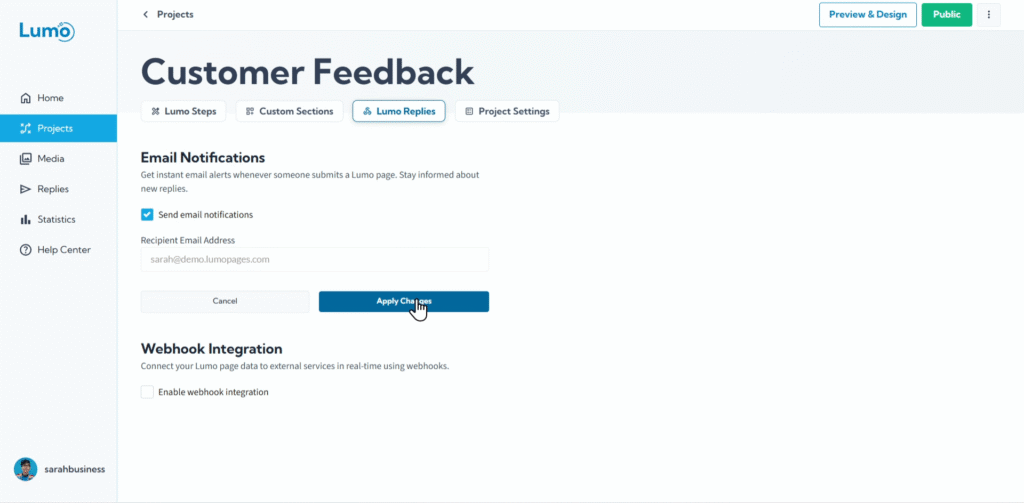
Email notifications are incredibly useful for staying on top of new Lumo submissions, ensuring you can respond quickly to customer inquiries or review important feedback. If you've set up email notifications for your Lumos but aren't receiving them, it can be frustrating. However, this is a common issue with straightforward solutions.
This guide will walk you through the most frequent reasons why you might not be receiving LumoPages email notifications and how to troubleshoot them.
Common Reasons for Missing Email Notifications
Here are the most typical culprits when LumoPages notifications aren't landing in your inbox:
Issue 1: Notifications Not Enabled for the Specific Lumo
Each Lumo needs to have email notifications explicitly enabled in its settings.
Solution:
- Enter Your Project Editor: Go to the Lumo project for which you're missing notifications.
- Access "Project Settings": Click on the "Project Settings" tab.
- Locate "Notifications" or "Email Alerts": Find the section dedicated to email notifications.
- Enable Notifications: Ensure the toggle switch or checkbox for email notifications is set to "On" or checked.
- Save: Click the "Save" button for your Lumo project.
Issue 2: Notifications Sent to the Wrong Email Address
LumoPages sends notifications to your registered account email. If this email is incorrect or you're checking a different inbox, you won't see them.
- Problem: The email you're looking in is different than the one registered.
- Solution: Go to the inbox of the verified registered email for your account and check there for incoming emails.
Issue 3: Emails Are Being Filtered by Your Email Provider (Spam/Junk/Promotions)
Email providers sometimes misclassify legitimate emails as spam or put them into separate folders.
Solution:
- Check Spam/Junk Folder: Thoroughly check your email's spam, junk, or clutter folders.
- Check Other Tabs/Categories (e.g., Gmail): If you use Gmail, check the "Promotions," "Social," or "Updates" tabs.
- Mark as "Not Spam" and Add to Contacts: If you find a LumoPages notification in spam, mark it as "Not Spam" or "Not Junk." Add the LumoPages sender email address ([email protected]) to your email contacts or safe sender list. This teaches your email provider that these emails are legitimate.
Issue 4: Email Server Issues or Delays
Occasionally, there might be temporary issues with email servers or internet connectivity causing delays.
Solution:
- Wait a Few Minutes: Sometimes, emails are just delayed. Wait 5-10 minutes.
- Test Again: Submit a new test response to your Lumo and see if the notification comes through.
- Check System Status: If you suspect a widespread issue, you might check LumoPages' status page (if available) or social media for announcements.
Issue 5: "Require Verified Email for Notifications" Option
If this advanced option is enabled, and your account's email somehow becomes unverified (though unlikely for a registered email), notifications might cease.
Solution:
- Check Option in Project Settings: In the "Notifications" section of your Lumo's Project Settings, see if "Only send to verified email" or similar is enabled.
- Verify Email: If you suspect your email is unverified (rare for a logged-in account), contact support.
General Troubleshooting Tips
- Submit a Test Response: The best way to troubleshoot is to submit a new test response to your Lumo. This triggers a fresh notification attempt.
- Check LumoPages Inbox: Always confirm that the response is actually showing up in your LumoPages Inbox. If it's not there, the issue is with the submission itself, not the notification.
- Contact Support: If you've tried all the above steps and are still not receiving notifications, it's time to reach out to LumoPages customer support with details of your Lumo and the troubleshooting steps you've already taken.
By systematically checking these common causes, you should be able to restore your LumoPages email notifications and stay instantly informed about all new submissions.