Designing Your Lumo
Lumo's Progress Tracker
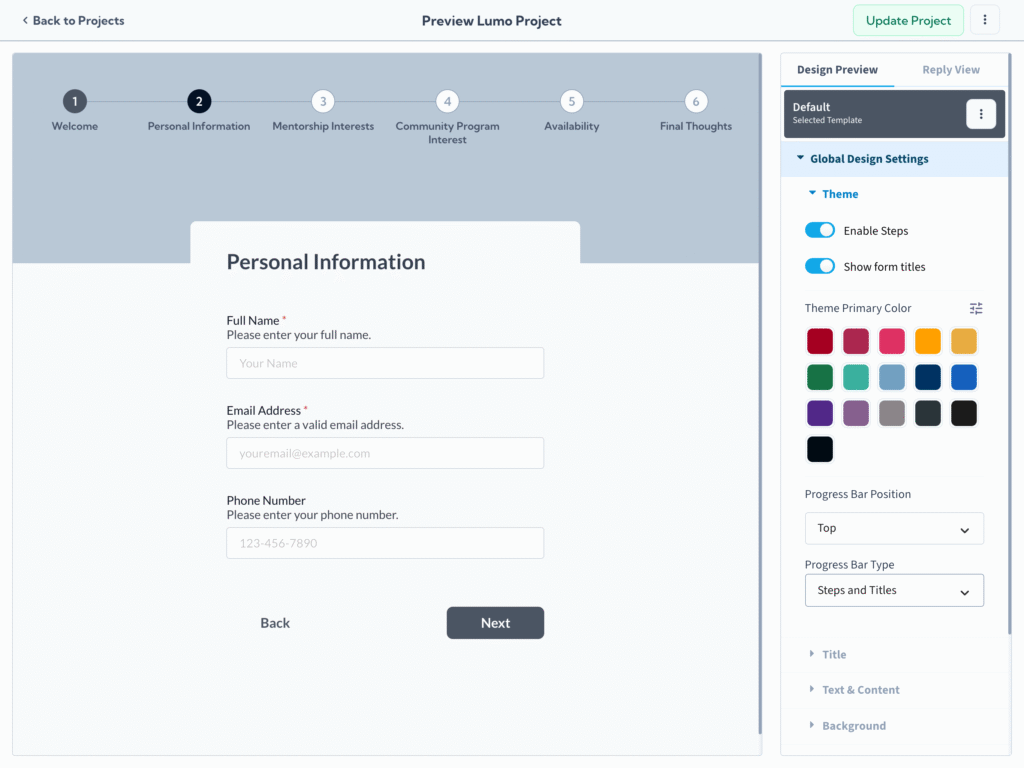
Multi-stage forms can sometimes feel overwhelming to users. Lumo's optional Progress Tracker feature is designed to combat this by providing a clear, visual indication of where the user is within the submission process. This simple addition can significantly improve form completion rates by setting clear expectations and offering positive reinforcement as users move forward.
Why Use a Progress Tracker?
- Reduces User Anxiety: Users know exactly how much work is left, making the form feel less daunting.
- Improves Completion Rates: Clear progress visualization motivates users to continue to the end.
- Professional Appearance: Adds a polished, modern touch to your digital forms.
Tracker Options and Customization
Lumo provides flexibility in how and where your progress tracker appears, ensuring it fits your design aesthetic and functional needs:
Tracker Location
You can choose where the tracker is positioned relative to your form content:
- Inside the Frame (Top or Bottom): The tracker is integrated within the main area of the Lumo, moving with the page content.
- Outside the Frame (Top or Bottom): The tracker is positioned outside the main form content, often remaining fixed (sticky) on the screen during scrolling for constant visibility.
Tracker Types
Lumo offers several visual styles to best represent the user's progress:
- Progress Bar: A simple, continuous bar that fills up as the user advances through stages. Best for minimalist design when stage titles aren't necessary.
- Steps: Displays discrete indicators (e.g., circles or dots) for each stage. Best for forms with a small to medium number of stages.
- Steps with Titles: Displays discrete indicators along with the name of each stage. Best for providing maximum clarity and guiding the user through logical sections.
By adding a progress tracker, you are not just counting steps. You are actively managing user attention and dramatically improving the user flow in your multi-stage Lumos.