Publishing and Sharing
Setting Your Lumo's Unique Web Address (Slug)
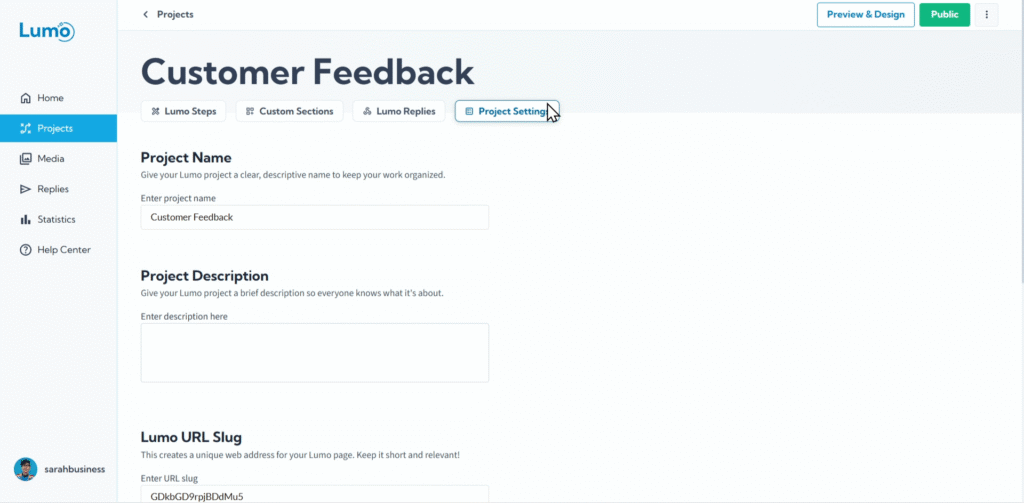
Every Lumo you create in LumoPages needs a unique web address, or URL, so your users can find and access it online. A crucial part of this URL is the "Slug," the customizable, human-readable part of the address that identifies your specific Lumo. Setting a meaningful slug makes your links cleaner, easier to remember, and more professional.
This guide will walk you through how to define and customize the unique web address (slug) for your Lumo.
What is a "Slug"?
In the context of a web address, a "Slug" is the part of the URL that comes after the domain name and identifies a specific page or content. For example, in https://live.lumopages.com/username/my-feedback-form, my-feedback-form is the slug.
Why it's important:
- Readability: A descriptive slug makes the URL easy to understand at a glance.
- Memorability: A short, relevant slug is easier for users to remember and type.
- Professionalism: A clean URL looks more professional than one filled with random characters.
Step-by-Step: Setting Your Lumo's Unique Web Address (Slug)
Enter Your Desired Slug. Type your desired unique slug into the field.
Rules for Slugs:
- Slugs typically use only lowercase letters, numbers, and hyphens (
-). - Avoid spaces (use hyphens instead).
- Keep it concise and descriptive.
- It must be unique within your LumoPages account. If you try to use a slug that's already taken by another one of your Lumos, the system will notify you.
Choose a slug that directly relates to the content of your Lumo. This makes it easier for users to understand what the link is about before they even click it.
Saving Your Changes
After setting your Lumo's unique web address (slug), it is crucial to manually save your changes to your project. Look for the "Apply Changes" button and click it.
Once saved, your Lumo's public URL will be updated to reflect this new slug. If you share the old URL, it might no longer work. If your Lumo is currently live, consider updating any places where you've shared the old link after changing and saving the slug.
By customizing your Lumo's slug, you create a cleaner, more memorable, and professional web address, making it easier for your audience to access your digital forms. This is a small detail that significantly enhances the user's perception of your brand.