Publishing and Sharing
Sharing Your Lumo Directly
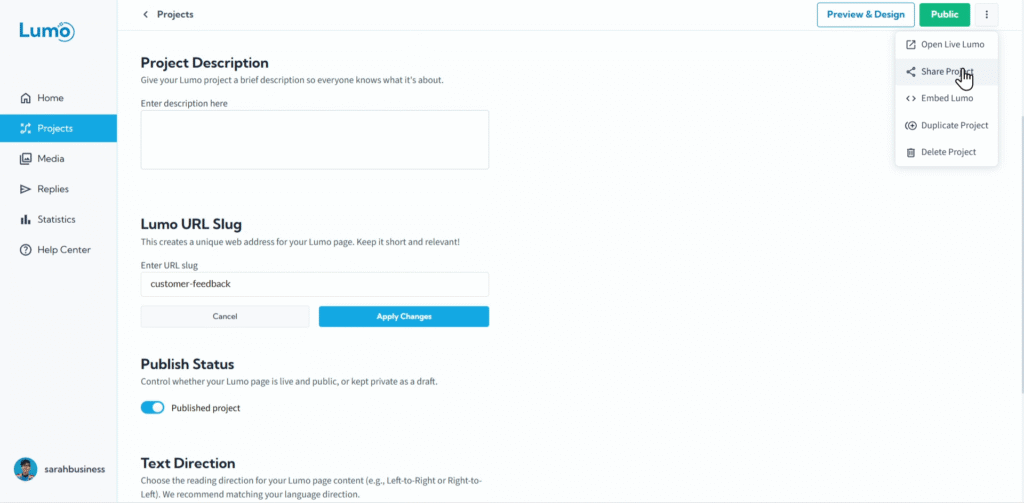
Once your Lumo is built, beautifully designed, and set to "Public" status, the next step is to get it in front of your audience! The simplest and most common way to do this is by sharing its direct link. This unique URL allows anyone with the link to access and interact with your digital form instantly.
This guide will walk you through how to find and share your Lumo's direct link.
Why Share Your Lumo Directly?
- Simplicity: It's the quickest and easiest way to distribute your Lumo.
- Versatility: The direct link can be used almost anywhere online: in emails, social media posts, chat messages, or even embedded into websites.
- Direct Access: Users click the link and land directly on your Lumo, ready to engage.
Step-by-Step: Sharing Your Lumo's Direct Link
Copy and Share Your Direct Link: Within the "Share" modal, you'll see several options to share.
- The URL will look like https://live.lumopages.com/username/your-lumo-slug. The your-lumo-slug part is the custom web address you set up in the previous guide.
Share Your Lumo! Once the link is copied, you can paste it anywhere you want to share your Lumo, or use direct sharing option:
- In Emails: Send it to your mailing list or individual customers.
- Messaging Apps: Paste it into WhatsApp, Telegram, or other chat platforms.
- Social Media: Include it in your Facebook, Instagram bio, or LinkedIn posts.
- Website/Blog: Add it as a hyperlink in text on your website or blog (for embedding options, see the dedicated guide).
- QR Codes: Generate a QR code from this link for print materials.
Sharing your Lumo directly via its unique web address is the most fundamental way to get your digital form out to your audience. It's quick, easy, and universally compatible. Next, we'll explore more integrated ways to share your Lumo on social media platforms.