Field Blocks Guide
Conditional Block Settings
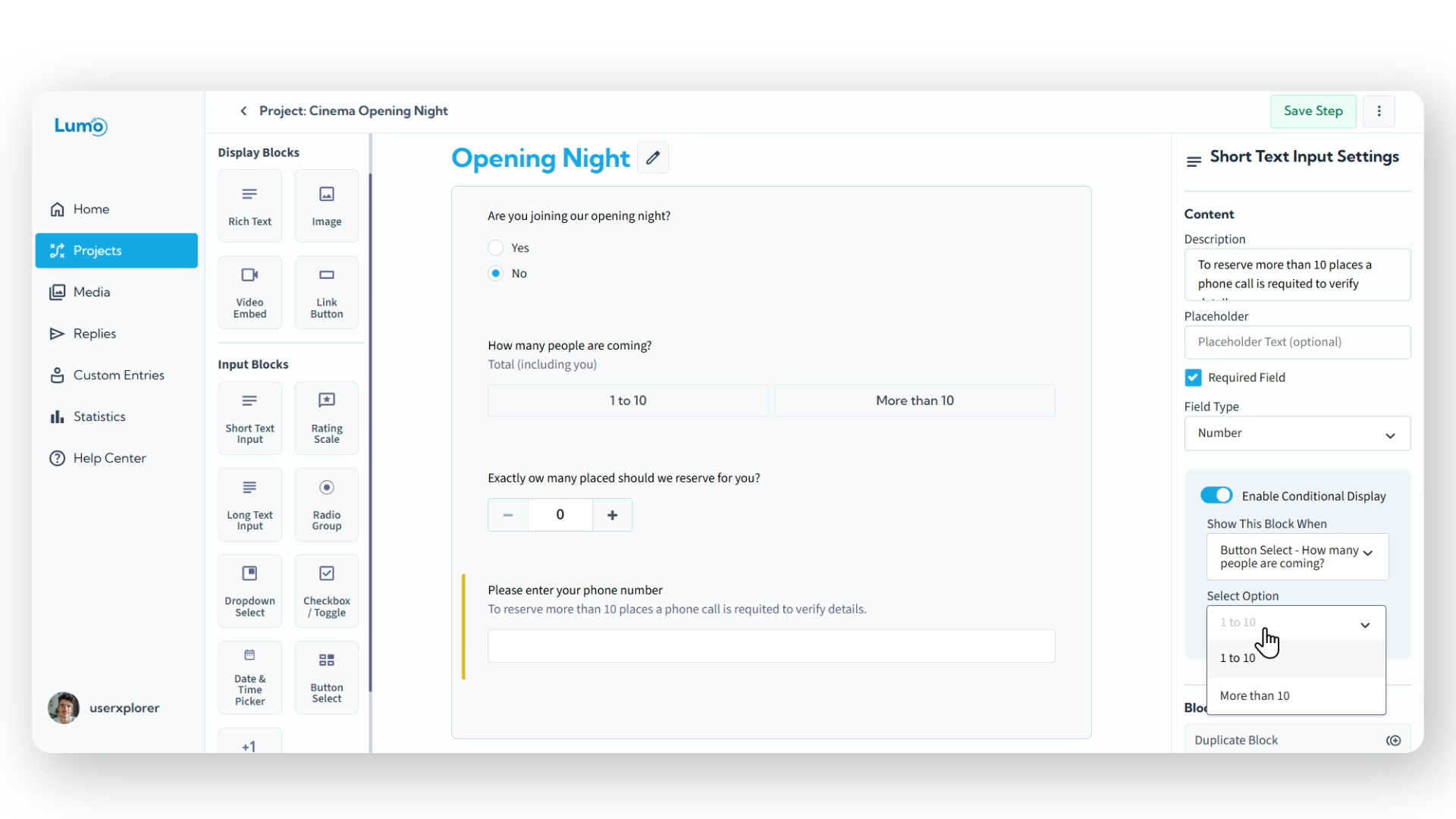
LumoPages allows you to build highly dynamic and intelligent forms using Conditional Block Settings. This powerful feature gives you precise control over which blocks appear or hide, based on how a user interacts with other parts of your form.
What Are Conditional Block Settings?
Conditional Block Settings enable you to establish specific rules for the visibility of any block within your form. This means a block will only be displayed to the user if certain conditions, tied to the responses in other blocks, are met. This capability is essential for creating personalized form experiences that present only the most relevant questions to each user.
How to Implement Conditional Logic
To set up a conditional block, access its settings and link its visibility to another field block in your form. You can then choose from various condition types:
Checkbox: Display a block only if a specific checkbox is checked or, conversely, if it's left unchecked.
- Example: Show a "Mailing Address" block only if the user checks an "Opt-in for Mail" checkbox.
Dropdown: Make a block visible if a particular option is selected from a dropdown list.
- Example: If a user selects "Other" in a "Reason for Inquiry" dropdown, display a text field titled "Please Specify."
Radio Group: Show a block based on the selected option within a radio group.
- Example: If "Yes" is selected for "Are you a returning customer?", display a "Previous Order ID" field.
Button Choice: Control visibility based on which option is chosen from a button choice block.
- Example: If "Enterprise package" is selected, reveal a "Customization Options" block.
Counter: Display a block when the value in a Counter block meets a specific numerical condition (e.g., greater than, less than, or equal to a set value).
Advantages of Using Conditional Blocks
Integrating conditional logic into your forms offers significant benefits:
- Tailored User Experience: Presenting only relevant questions reduces form fatigue and makes the experience more efficient for the user.
- Streamlined Forms: Your forms appear cleaner and less cluttered, as unnecessary fields remain hidden until needed.
- Improved Data Quality: By guiding users through a logical path, you're more likely to collect accurate and complete information.
- Intelligent Workflow: Create a conversational flow where the form adapts in real-time to user input.
If you try to navigate away from the editor without saving changes on conditional blocks settings, LumoPages will remind you to save your work. Always pay attention to these prompts to avoid losing your progress, especially if your Lumo is live!
Conditional Block Settings are a powerful tool for building sophisticated, user-centric forms that adapt to individual responses, ensuring a smoother and more effective data collection process.