Getting Started
Navigating the Dashboard
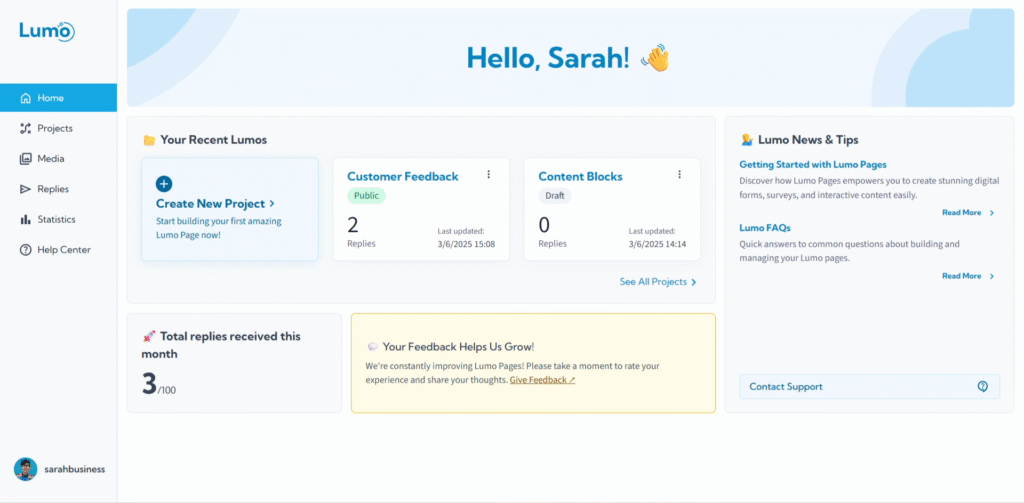
Welcome to your LumoPages dashboard! This is your central command center, designed to give you a quick overview of your account, your projects, and key activities. Think of it as the homepage for your LumoPages journey.
Once you log in, the dashboard is the first place you'll land. It's built to be intuitive, ensuring you can easily find what you need to start creating, manage your existing Lumos, and keep track of your performance.
Exploring Your Dashboard
Your dashboard is thoughtfully organized into several key areas:
1. Recent Projects
This section provides immediate access to the Lumos you've been working on most recently. It's perfect for picking up right where you left off.
- You'll see a quick list of your latest projects, allowing you to click directly into their editors.
2. Articles and Latest Updates
Stay informed with the newest features, tips, and news from LumoPages! This section keeps you updated on platform enhancements and helpful articles.
- You'll find links to blog posts, tutorials, and announcements.
Make sure to check this section regularly to discover new ways to make your Lumos even better!
3. Monthly Submission Statistics
Get a quick glance at your form activity! This section provides a summary of your form submissions for the current month.
- You'll see the total number of responses received across all your Lumos.
- This helps you monitor your usage against your plan limits.
4. Help Center Link
Need assistance or a detailed guide? A prominent link to our comprehensive Help Center is always available on your dashboard.
- Clicking this link will take you directly to a vast library of articles and tutorials to answer your questions.
5. Main Navigation Menu
On the left side (or top, depending on your screen size), you'll find the main navigation menu. This is your gateway to all core sections of the LumoPages platform:
- Home: Takes you back to this dashboard.
- Projects: View and manage all your Lumos, both active and in draft.
- Media: Access your uploaded images and manage your storage.
- Submitted Forms (Inbox): See all the responses collected from your Lumos.
- Account Management: Update your profile, manage billing, and change account settings.
Your Central Hub
The dashboard is designed to be your efficient starting point for all your LumoPages activities. From a quick check on your form's performance to jumping straight into editing a project, it's all here.
Next, we'll dive into the Account Management section, where you can personalize your profile and manage your subscription details.